• Please stop embedding files/images from Discord. Discord has anti-hotlinking logic in place that breaks links to Discord hosted files and images when linked to from anywhere outside of Discord. There are a multitude of file/image hosting sites you can use instead.

    (more info here)

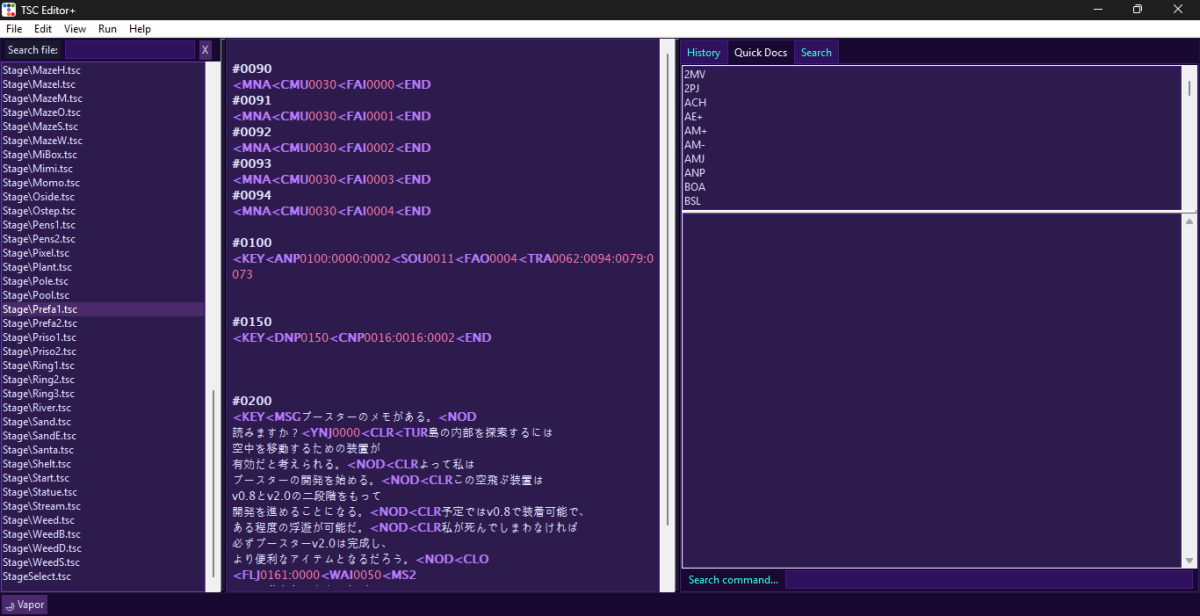
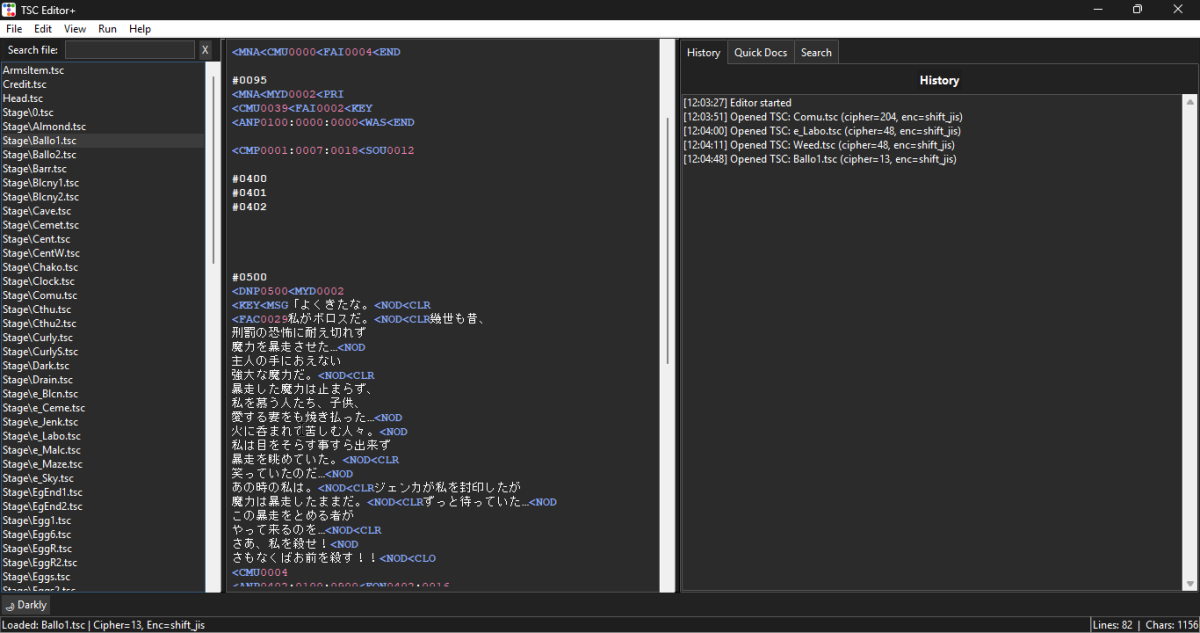
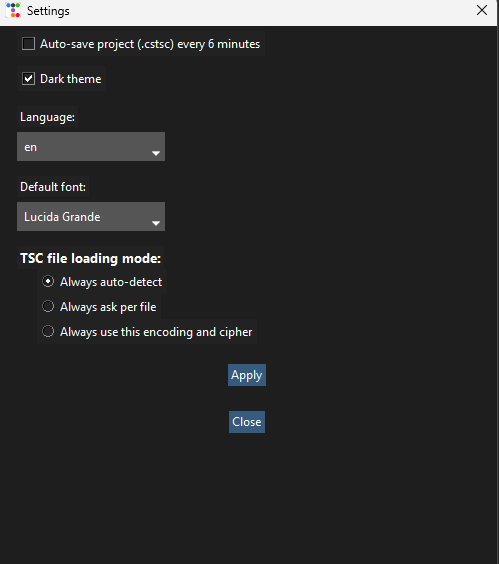
TSC Editor+

May 15, 2026 at 3:24 AM
Senior Member
"Master using it, and you can have this!"
Join Date: Nov 29, 2025
Location: Venezuela
Posts: 70
Age: 21
Pronouns: He/Him
Gender Notes: I'm a Deathcore Purist.
It's not your fault, dark mode was planned from the start, the only thing I hadn't considered was your PC, which I'd forgotten is 4x worse than mine XD
Well, i would say 5x worse XD
 
May 16, 2026 at 1:00 AM
Been here way too long...
"All your forum are belong to us!"
Join Date: Oct 7, 2013
Location: India
Posts: 604
Neat program! I like all the features, and the layout is very nice and clean.
It would be nice to have the current tsc file's name as a header while you're editing it, or maybe have it coloured in in the file directory listing on the left.
Also maybe it's just me but I think it would help to have the 'search command' box at the top instead of the bottom.
Lastly, it would be cool if eventually you added things like face previews, or things like mentioning what direction so-and-so fade number is when you hover on it, etc. But that probably takes a lot of time and effort and might not be worth it.
Now, I tried opening a Japanese mod with this program and it largely works, but a few files (that i assume must be in shift-jis like all the others) were interpreted as being in utf-8 or cp850, and hence look like gibberish. I don't know what causes this, but it might be helpful to have a manual override for the encoding scheme.
Another issue is that almost all script files are cut off midway for some reason, which makes this unusable for now. I'm not sure if it's just my computer or what.
I've linked the mod I'm using, maybe you can see if these issues are reproducible. Thanks!

 
Last edited:
May 16, 2026 at 3:49 AM
Senior Member
"Wahoo! Upgrade!"
Join Date: Oct 23, 2025
Location: Dominican Republic
Posts: 51
Age: 18
Pronouns: he/him
Neat program! I like all the features, and the layout is very nice and clean.
It would be nice to have the current tsc file's name as a header while you're editing it, or maybe have it coloured in in the file directory listing on the left.
Also maybe it's just me but I think it would help to have the 'search command' box at the top instead of the bottom.
Lastly, it would be cool if eventually you added things like face previews, or things like mentioning what direction so-and-so fade number is when you hover on it, etc. But that probably takes a lot of time and effort and might not be worth it.
Now, I tried opening a Japanese mod with this program and it largely works, but a few files (that i assume must be in shift-jis like all the others) were interpreted as being in utf-8 or cp850, and hence look like gibberish. I don't know what causes this, but it might be helpful to have a manual override for the encoding scheme.
Another issue is that almost all script files are cut off midway for some reason, which makes this unusable for now. I'm not sure if it's just my computer or what.
I've linked the mod I'm using, maybe you can see if these issues are reproducible. Thanks!
Okay, I plan to move the TSC command search bar higher up, and to make it more like Windows 11 I'll also add tabs, I will also fix the problem with the characters (?) in Japanese TSC. What do you mean by TSCs getting cut off halfway through? It's possibly because the encryption only supports files with a certain number of lines; if it exceeds that limit, it gets cut off (or so I assume). Another feature you requested is the classic Face Preview from Cave Editor; it will be added, as well as ORG Preview (for now, animated faces and OGG files from CS+ versions will not be supported by the preview for now). I knew about the thousands of bugs it had, so I uploaded it as a release instead of a beta (I don't know why XD). Since I'm still learning to use Python libraries, it will probably take me a while to add features; I'll focus on fixing everything.

I'll add a menu to manually select encryption, but if you import an entire folder, the encryption will apply to all TSCs.
 
Last edited:
May 16, 2026 at 10:39 AM
Sincerity will always triumph over irony.
Modding Community Discord Admin
"What're YOU lookin' at?"
Join Date: Apr 23, 2013
Location: In a cave above the surface.
Posts: 1101
Age: 28
Pronouns: He/They
Gender Notes: More info at a later date.
Okay, I plan to move the TSC command search bar higher up, and to make it more like Windows 11 I'll also add tabs, I will also fix the problem with the characters (?) in Japanese TSC. What do you mean by TSCs getting cut off halfway through? It's possibly because the encryption only supports files with a certain number of lines; if it exceeds that limit, it gets cut off (or so I assume). Another feature you requested is the classic Face Preview from Cave Editor; it will be added, as well as ORG Preview (for now, animated faces and OGG files from CS+ versions will not be supported by the preview for now). I knew about the thousands of bugs it had, so I uploaded it as a release instead of a beta (I don't know why XD). Since I'm still learning to use Python libraries, it will probably take me a while to add features; I'll focus on fixing everything.

I'll add a menu to manually select encryption, but if you import an entire folder, the encryption will apply to all TSCs.
They are talking about Encoding, not Encryption. Booster's Lab allows you to change the encoding because freeware TSC does not use Unicode/UTF-8 but instead ShiftJIS (which for English is mostly akin to Ascii). Your program needs to handle this instead of trying to guess what the encoding is when it opens the file.
 
May 16, 2026 at 9:27 PM
Senior Member
"Wahoo! Upgrade!"
Join Date: Oct 23, 2025
Location: Dominican Republic
Posts: 51
Age: 18
Pronouns: he/him
They are talking about Encoding, not Encryption. Booster's Lab allows you to change the encoding because freeware TSC does not use Unicode/UTF-8 but instead ShiftJIS (which for English is mostly akin to Ascii). Your program needs to handle this instead of trying to guess what the encoding is when it opens the file.
II just want to know what kind of encryption and ciphering the TSCs of the original Japanese game use to improve the automatic mode.
I will also add Manual Mode.
 
Last edited:
May 17, 2026 at 1:44 AM
Been here way too long...
"All your forum are belong to us!"
Join Date: Oct 7, 2013
Location: India
Posts: 604
What do you mean by TSCs getting cut off halfway through?
Okay, I think I figured it out :pignon: your decryption code had a small error that was causing null characters appear in the decoded text. On line 2412 of main.py, replace "val = 0" with "val += 256". You were clamping the result of the cipher subtraction, but apparently it needs to wrap around. I assume you'd need a similar fix for encryption: at line 2425, replace "val = b + cipher" with "(val = b + cipher) % 256", and delete lines 2426 and 2427. Feel free to double-check this idea.
 
Back
Top